Logitech MX Revolution configuration
August 24, 2009 at 10:44 PM | categories: Linux | View Comments
The other day @shuckins mentioned that
I'm finding the MX Revolution quite awesome except that I really miss my scroll wheel click button.
This was an issue that I had when I started using this mouse as well. The key feature of the mouse being that a middle click will switch the scroll wheel from smooth movement to discrete (chunky?) movement and back again. This is actually very cool to use once you've gotten accustomed to having the option of scrolling down a page with fine control of speed/distance and then click once to then flick back up to the top of a page.
What I did to make my life easier with this mouse was setup the thumb scroll wheel to act as my middle click that I was accustomed to having. I accomplished this via the btnx-config program as available from the btnx website.
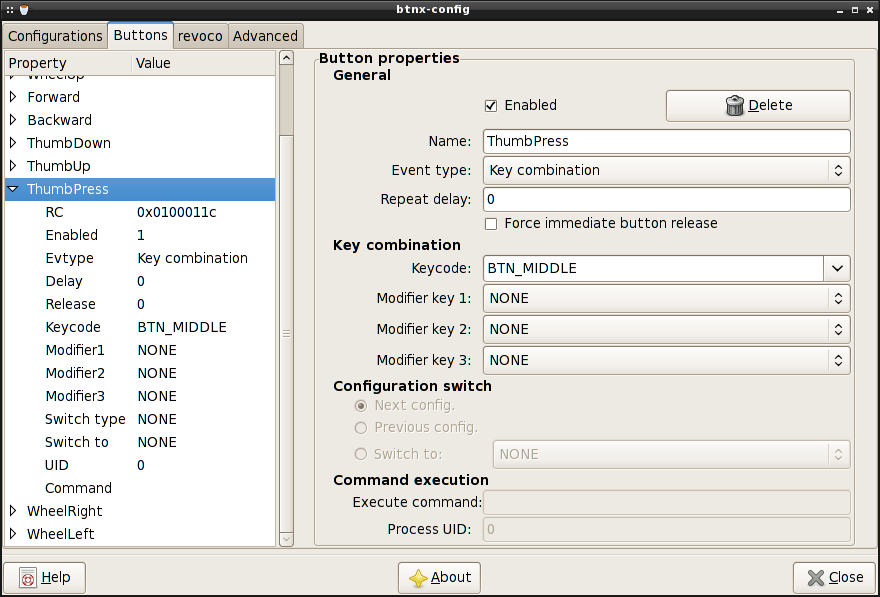
Configuration for thumb wheel press/click
Once I found out how easy it was to get the middle click from the thumb wheel I decided to make the thumb up/down also have some functionality. If you use firefox and/or gnome terminal I find the most useful thing to map was thumb up to shift pageup and thumb down to shift pagedown.

Configuration for thumb wheel down
With these set this way I can switch tabs on both firefox and gnome-terminal w/o moving back to the keyboard. The other neat thing I found (when I actually noticed) was that this mapping holds even when using synergy to control two (or more) machines.
The mouse works great, and I haven't in recent memory ever like a mouse as much as I have this one. Couple the nice manufacturing with the ease of button configuration provided by the great programmers of btnx and I think its the perfect mouse for a programmer. Especially one who doesn't like to have to constantly switch between using the mouse and keyboard.
- blog comments powered by Disqus

